Home / Barcode Generator
Barcode Generator
Create QR and 1D barcodes (Code 128, EAN, UPC, ISBN and more) online for free and export them as PNG, SVG or PDF.
Open the generator →
What is a barcode?
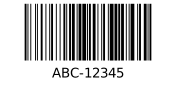
Code 128 is a high-density 1D barcode that encodes the full ASCII set (numbers, letters, symbols) while staying very compact.
It is the standard for internal labeling, shipping labels and Amazon FNSKU – flexible and reliably scannable.
Technical details
- Category
- 1D linear barcode
- Data & character set
- full ASCII set (128 characters: digits, upper/lowercase, symbols)
- Capacity
- variable length, practically unlimited
- Check / error correction
- internal Modulo-103 check character (automatic)
- Norm / standard
- ISO/IEC 15417
- Size & printing
- very compact; free bar height
- Good to know
- Three character sets (A/B/C) – set C compresses digit pairs and saves space for numeric data.
Compared to related codes
| Code | Category | Data & character set |
|---|---|---|
| barcode | 1D linear barcode | full ASCII set (128 characters: digits, upper/lowercase, symbols) |
| QR code | 2D matrix code | text, URLs, digits, binary, WiFi, SEPA/GiroCode |
| EAN-13 barcode | 1D retail barcode | 13 digits (GTIN-13) |
This helps you pick the right code type for your use case faster.
How to create a barcode
- The type “barcode” is preselected – you can change it anytime in the generator.
- Enter your value (example: ABC-12345).
- Adjust colors, module size and the quiet zone and check the live preview.
- Download the barcode as PNG, SVG or PDF, or print an A4 label sheet.
Use cases
- Warehouse and logistics
- Retail and point of sale
- Product labelling
- Label printing
Tips for clean printing & scanning
- Keep contrast high and avoid scaling that merges thin bars.
- Give the code enough quiet zone and print at 300 dpi or more.
- For long data Code 128 is denser; Code 39 is more robust with basic printers.
Features
- Free and no sign-up
- Instant live preview
- Export as PNG, SVG and PDF
- Customizable colors, size and caption
- Batch generation & A4 label printing
- Works on desktop and mobile
FAQ
- How do I create a barcode?
- Choose the type, enter your value (e.g. ABC-12345), adjust the design and download the barcode as PNG, SVG or PDF.
- What is a barcode used for?
- Typical use cases are Warehouse and logistics, Retail and point of sale, Product labelling, Label printing.
- What is an example value for a barcode?
- A valid example is “ABC-12345”. Just enter your own value and the barcode is generated instantly in the preview.
- Is the Barcode Generator free?
- Yes. Barcode Studio is completely free and requires no sign-up.
- Which download formats are available?
- You can export as PNG, SVG or PDF and print directly.
- Does it work on mobile?
- Yes, Barcode Studio runs in any modern browser on desktop and mobile.
Related codes
Related guides
Trustpilot