Home / GS1 Barcode Generator
GS1 Barcode Generator
Create GS1-128 barcodes online for free – for supply chains, logistics and standardized application identifiers (AI).
Open the generator →
What is a GS1-128 barcode?
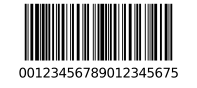
GS1-128 (formerly EAN-128) extends Code 128 with standardized application identifiers (AIs), carrying batch, quantity, expiry and serial numbers in a single code.
It is the backbone of modern logistics and GS1 processes for pallets, shipping units and traceability.
Technical details
- Category
- 1D linear barcode (logistics)
- Data & character set
- ASCII with standardized data identifiers (GS1 Application Identifiers)
- Capacity
- multiple data fields in one code
- Check / error correction
- internal Modulo-103 check + FNC1 separators
- Norm / standard
- GS1 General Specifications (based on Code 128)
- Size & printing
- compact; free height
- Good to know
- AIs such as (01) GTIN, (10) batch or (17) expiry make the code self-describing – the backbone of the supply chain.
Compared to related codes
| Code | Category | Data & character set |
|---|---|---|
| GS1-128 barcode | 1D linear barcode (logistics) | ASCII with standardized data identifiers (GS1 Application Identifiers) |
| Code 128 barcode | 1D linear barcode | full ASCII set (128 characters: digits, upper/lowercase, symbols) |
| Code 39 barcode | 1D linear barcode | A–Z, 0–9 and - . $ / + % plus space |
| ITF barcode | 1D linear barcode (numeric) | digits only, always an even count |
This helps you pick the right code type for your use case faster.
How to create a GS1-128 barcode
- The type “GS1-128 barcode” is preselected – you can change it anytime in the generator.
- Enter your value (example: 00123456789012345675).
- Adjust colors, module size and the quiet zone and check the live preview.
- Download the GS1-128 barcode as PNG, SVG or PDF, or print an A4 label sheet.
Use cases
- Supply chains and logistics
- Shipping units
- GS1 standards
Tips for clean printing & scanning
- Add a bearer bar to catch print defects on corrugated cardboard.
- Choose a generous bar height so hand scanners read from various angles.
- With GS1 application identifiers (AIs) mind the correct order and FNC1 separation.
Features
- Free and no sign-up
- Instant live preview
- Export as PNG, SVG and PDF
- Customizable colors, size and caption
- Batch generation & A4 label printing
- Works on desktop and mobile
FAQ
- How do I create a GS1-128 barcode?
- Choose the type, enter your value (e.g. 00123456789012345675), adjust the design and download the GS1-128 barcode as PNG, SVG or PDF.
- What is a GS1-128 barcode used for?
- Typical use cases are Supply chains and logistics, Shipping units, GS1 standards.
- What is an example value for a GS1-128 barcode?
- A valid example is “00123456789012345675”. Just enter your own value and the GS1-128 barcode is generated instantly in the preview.
- Is the GS1 Barcode Generator free?
- Yes. Barcode Studio is completely free and requires no sign-up.
- Which download formats are available?
- You can export as PNG, SVG or PDF and print directly.
- Does it work on mobile?
- Yes, Barcode Studio runs in any modern browser on desktop and mobile.
Related codes
Related guides
Trustpilot